---
title: "Novel – AI-powered Notion-style editor"
description: "A Notion-style WYSYWIG editor with AI-powered autocompletions, built with Tiptap, OpenAI, and Vercel AI SDK."
url: "https://vercel.com/templates/next.js/novel"
links:
repository: "https://github.com/steven-tey/novel"
demo: "https://novel.sh/"
deploy: "https://vercel.com/new/clone?demo-title=Novel+%E2%80%93+AI-powered+Notion-style+editor&demo-description=A+Notion-style+WYSYWIG+editor+with+AI-powered+autocompletions%2C+built+with+Tiptap%2C+OpenAI%2C+and+Vercel+AI+SDK.&demo-url=https%3A%2F%2Fnovel.sh%2F&demo-image=%2F%2Fimages.ctfassets.net%2Fe5382hct74si%2F3YXmOo0YQBrFMSYE4RjswC%2F0444303eff1ccab53a724f50ab9e9578%2Fopengraph-image.png&project-name=Novel+%E2%80%93+AI-powered+Notion-style+editor&repository-name=novel&repository-url=https%3A%2F%2Fgithub.com%2Fsteven-tey%2Fnovel&from=templates&skippable-integrations=1&env=OPENAI_API_KEY&envDescription=Get+your+OpenAI+API+key%3A&envLink=https%3A%2F%2Fplatform.openai.com%2Faccount%2Fapi-keys&root-directory=apps%2Fweb"
---
# Novel – AI-powered Notion-style editor
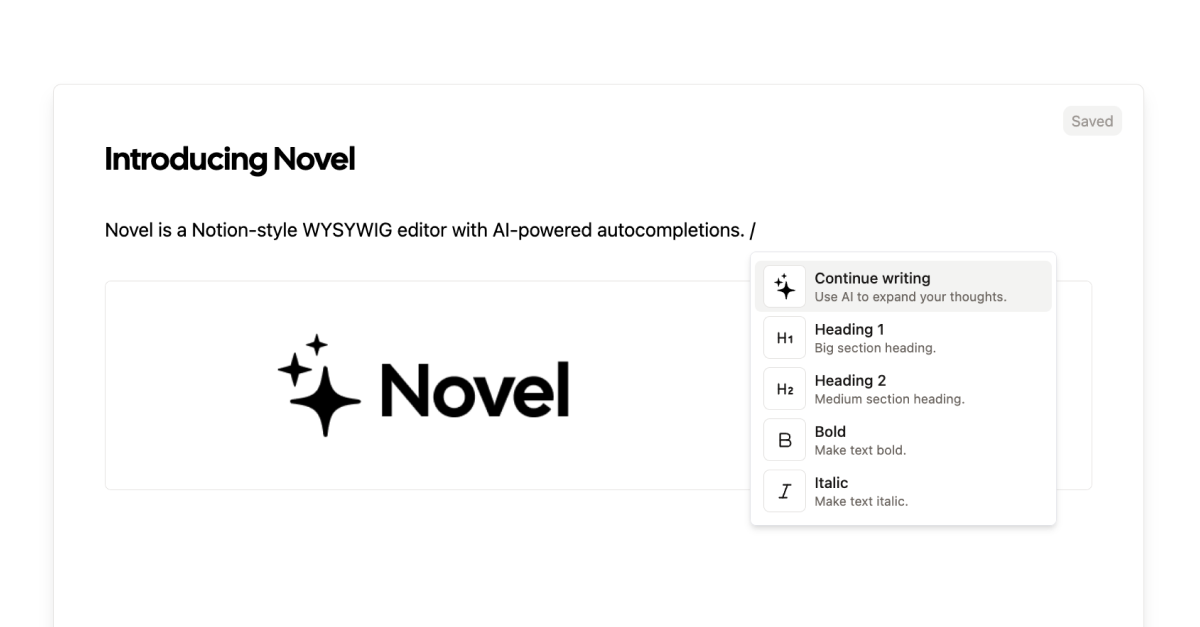
A Notion-style WYSYWIG editor with AI-powered autocompletions, built with Tiptap, OpenAI, and Vercel AI SDK.
Novel
An open-source Notion-style WYSIWYG editor with AI-powered autocompletions.



Introduction ·
Deploy Your Own ·
Setting Up Locally ·
Tech Stack ·
Contributing ·
License
## Docs (WIP)
https://novel.sh/docs/introduction
## Introduction
[Novel](https://novel.sh/) is a Notion-style WYSIWYG editor with AI-powered autocompletions.
https://github.com/steven-tey/novel/assets/28986134/2099877f-4f2b-4b1c-8782-5d803d63be5c
## Deploy Your Own
You can deploy your own version of Novel to Vercel with one click:
[](https://stey.me/novel-deploy)
## Setting Up Locally
To set up Novel locally, you'll need to clone the repository and set up the following environment variables:
- `OPENAI_API_KEY` – your OpenAI API key (you can get one [here](https://platform.openai.com/account/api-keys))
- `BLOB_READ_WRITE_TOKEN` – your Vercel Blob read/write token (currently [still in beta](https://vercel.com/docs/storage/vercel-blob/quickstart#quickstart), but feel free to [sign up on this form](https://vercel.fyi/blob-beta) for access)
If you've deployed this to Vercel, you can also use [`vc env pull`](https://vercel.com/docs/cli/env#exporting-development-environment-variables) to pull the environment variables from your Vercel project.
To run the app locally, you can run the following commands:
```
pnpm i
pnpm dev
```
## Cross-framework support
While Novel is built for React, we also have a few community-maintained packages for non-React frameworks:
- Svelte: https://novel.sh/svelte
- Vue: https://novel.sh/vue
## VSCode Extension
Thanks to @bennykok, Novel also has a VSCode Extension: https://novel.sh/vscode
https://github.com/steven-tey/novel/assets/28986134/58ebf7e3-cdb3-43df-878b-119e304f7373
## Tech Stack
Novel is built on the following stack:
- [Next.js](https://nextjs.org/) – framework
- [Tiptap](https://tiptap.dev/) – text editor
- [OpenAI](https://openai.com/) - AI completions
- [Vercel AI SDK](https://sdk.vercel.ai/docs) – AI library
- [Vercel](https://vercel.com) – deployments
- [TailwindCSS](https://tailwindcss.com/) – styles
- [Cal Sans](https://github.com/calcom/font) – font
## Contributing
Here's how you can contribute:
- [Open an issue](https://github.com/steven-tey/novel/issues) if you believe you've encountered a bug.
- Make a [pull request](https://github.com/steven-tey/novel/pull) to add new features/make quality-of-life improvements/fix bugs.
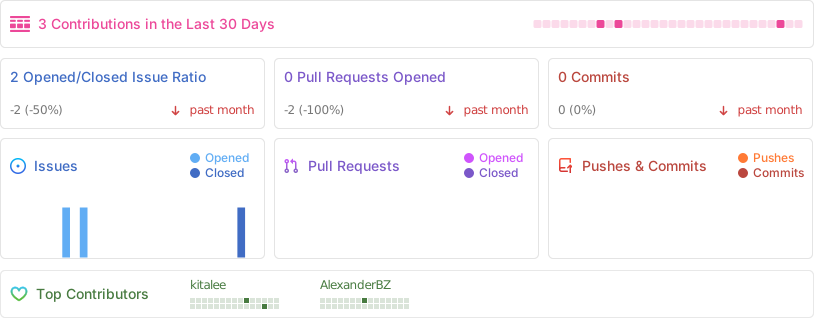
 ## Repo Activity
## License
Licensed under the [Apache-2.0 license](https://github.com/steven-tey/novel/blob/main/LICENSE).
## Related Templates
### [Liftoff – AI Mock Interview Simulator](https://vercel.com/templates/next.js/liftoff)
Liftoff is an interview preparation tool that provides AI feedback on your mock interviews, built with OpenAI Whisper and GPT.
### [ChatGPT Plugin Starter: WeatherGPT](https://vercel.com/templates/next.js/weathergpt)
The ultimate ChatGPT Plugin starter template. WeatherGPT is a ChatGPT Plugin to get the weather of any given location.
### [Chatbot UI](https://vercel.com/templates/next.js/chatbot-ui)
A ChatGPT clone for running locally in your browser.
---
## Additional documentation
The [Vercel Knowledge Base](https://vercel.com/kb) contains guides and answers to common questions about Vercel, including deployment, framework configuration, domains, caching, and troubleshooting.
## Repo Activity

## License
Licensed under the [Apache-2.0 license](https://github.com/steven-tey/novel/blob/main/LICENSE).
## Related Templates
### [Liftoff – AI Mock Interview Simulator](https://vercel.com/templates/next.js/liftoff)
Liftoff is an interview preparation tool that provides AI feedback on your mock interviews, built with OpenAI Whisper and GPT.
### [ChatGPT Plugin Starter: WeatherGPT](https://vercel.com/templates/next.js/weathergpt)
The ultimate ChatGPT Plugin starter template. WeatherGPT is a ChatGPT Plugin to get the weather of any given location.
### [Chatbot UI](https://vercel.com/templates/next.js/chatbot-ui)
A ChatGPT clone for running locally in your browser.
---
## Additional documentation
The [Vercel Knowledge Base](https://vercel.com/kb) contains guides and answers to common questions about Vercel, including deployment, framework configuration, domains, caching, and troubleshooting.